Small Business Apps · Melbourne

Small Business Apps Melbourne

Practical apps for the parts of your business that still run on spreadsheets, memory and manual admin.

If your team is copying the same information between a spreadsheet, an inbox and a notebook, there’s a good chance a simple, purpose-built app could do that job for you — without the cost or complexity of a big software project. Double Bricks Digital designs and builds practical business apps for Melbourne small businesses, built around how you actually work.

Internal dashboards
Workflow automation
Google Apps Script
Google Workspace
DB
Operations
One place · updated automatically
Live
26
Assets tracked
0
Spreadsheets to reconcile
3
Need attention
Today
New booking recorded
Auto
Customer record updated
Auto
Service reminder due
1
Open workflow
tracker_v3_FINAL.xlsx
No more copy‑paste between tabs
The approach

Practical Business Apps Built Around How Your Business Works

Most small businesses don’t need enterprise software. They need something much simpler: a way to track what’s happening, cut down repetitive admin, and stop information living in five different places at once.

That’s the gap we build for. Rather than starting with a piece of technology and trying to make your business fit it, we start with your workflow — how work actually moves through your business day to day — and design something around that. Sometimes that’s a simple internal tool. Sometimes it’s a more structured system with several moving parts. Either way, the app should fit the business, not the other way around.

It sits alongside the rest of what we do, as a practical extension of the development work we already deliver.

Workflow first
We start with how work actually moves through your business — including the workarounds nobody has written down.
As simple as the problem allows
Sometimes that’s a simple internal tool. Sometimes it’s a more structured system with several moving parts.
Built to fit
The app should fit the business, not the other way around — no forcing your process into someone else’s template.
The tipping point

When a Spreadsheet Is No Longer Enough

Spreadsheets are a great starting point. The trouble is they don’t stay simple for long. Common signs a business has outgrown its spreadsheet-based process include:

tracker.xlsx
tracker_v2.xlsx
tracker_v3_FINAL.xlsx
tracker_USE_THIS_ONE.xlsx
?
So which one is the real one?
Multiple versions of the same spreadsheet floating around, with no single source of truth
Manually updating records that should really update themselves
Repetitive admin tasks that eat into time better spent on the business
Information split across spreadsheets, inboxes, paper forms and someone’s memory
Little visibility into what’s actually happening in the business day to day
Needing something more structured than a spreadsheet, but not wanting to pay for — or learn — a large, complicated platform
Existing off-the-shelf software that’s either too expensive, or built for a business twice your size
In short
If any of that sounds familiar, it’s usually a sign that a purpose-built app would save more time than it costs to build.
What we build

What Can a Small Business App Do?

Every business is different, so what we build depends on what you actually need. Examples of the kind of thing a small business app can support include:

Internal dashboards that give you a clear view of what’s happening in the business
One screen your team can actually trust, instead of five tabs and a hunch.
Workflow and task management tailored to your process
Centralised data management, replacing scattered spreadsheets and documents
Customer or booking management systems
Inventory or asset tracking
Reporting dashboards that pull information into one place
Approval workflows for internal sign-off processes
Operational tools specific to your industry or business
Custom calculators, forms or quoting tools
Integrations between different Google Workspace tools you already use
Replacing a manual, repetitive process with something that runs itself
Worth asking
This isn’t an exhaustive list — if you’ve got a process that feels harder than it should be, it’s worth a conversation. Where the process is a marketing one rather than an operational one, that’s usually a job for marketing automation instead.
How we build it

Small Business App Development Using Practical Technologies

Depending on what a project needs, we often build using Google Apps Script and other Google Workspace technologies. This lets us build genuinely useful internal tools — dashboards, workflow systems, automated processes — without the cost and lead time of a large custom software build. It’s a natural extension of our web design and development work.

Google Apps Script is one of the tools in our kit, not the whole proposition. For some businesses, an app built on top of Google Sheets and Workspace is exactly the right fit — affordable, flexible, and easy for your team to use since it lives in tools you probably already know. For other projects, a different approach might make more sense. We’ll recommend what actually fits your business rather than defaulting to one technology because it’s convenient for us.

A typical Workspace build
01
The tools your team already opens
Gmail, Drive, Calendar, Sheets — no new software to learn.
02
Google Apps Script
The logic layer: the rules, automations and screens built around your workflow.
03
Google Sheets as the data layer
Structured records your team can still read, export and trust.
Or not
If a different approach fits your business better, that’s the one we’ll recommend.
The build

From Manual Processes to a Smarter Business Workflow

Four stages, start to finish — each one grounded in how the work really happens rather than how it’s meant to happen on paper.

Stage 01
Understand the process
We start by understanding how the process actually works today — including the workarounds and manual steps that don’t show up in any manual.
Stage 02
Design the workflow
We map out what the system needs to do, in what order, and who needs to see what.
Stage 03
Develop the system
We build the app around that workflow, rather than forcing your business into a generic template.
Stage 04
Test and improve
We test the system against real, everyday use — and refine it based on how it’s actually used once it’s live.
Case study

Case Study: RR Automotive Fleet Management System

One example of this approach in practice is a fleet and rental management system we built for RR Automotive, a Victorian business that rents vehicles to customers from a fleet of around 26 vehicles.

RR Automotive needed a practical way to see, at a glance, which vehicles were available, which were out on hire, and which needed attention — along with a straightforward way to record new rentals and keep track of customer and vehicle information. We built a purpose-designed system around that exact workflow, covering everything from a fleet-wide dashboard through to individual rental records.

It’s a good example of what a “small business app” actually looks like in practice — not a generic off-the-shelf platform, but a system built specifically around how one business manages its day-to-day operations. You can read more about it in our case studies, and in more detail on our Fleet Management System Melbourne page.

See our work →
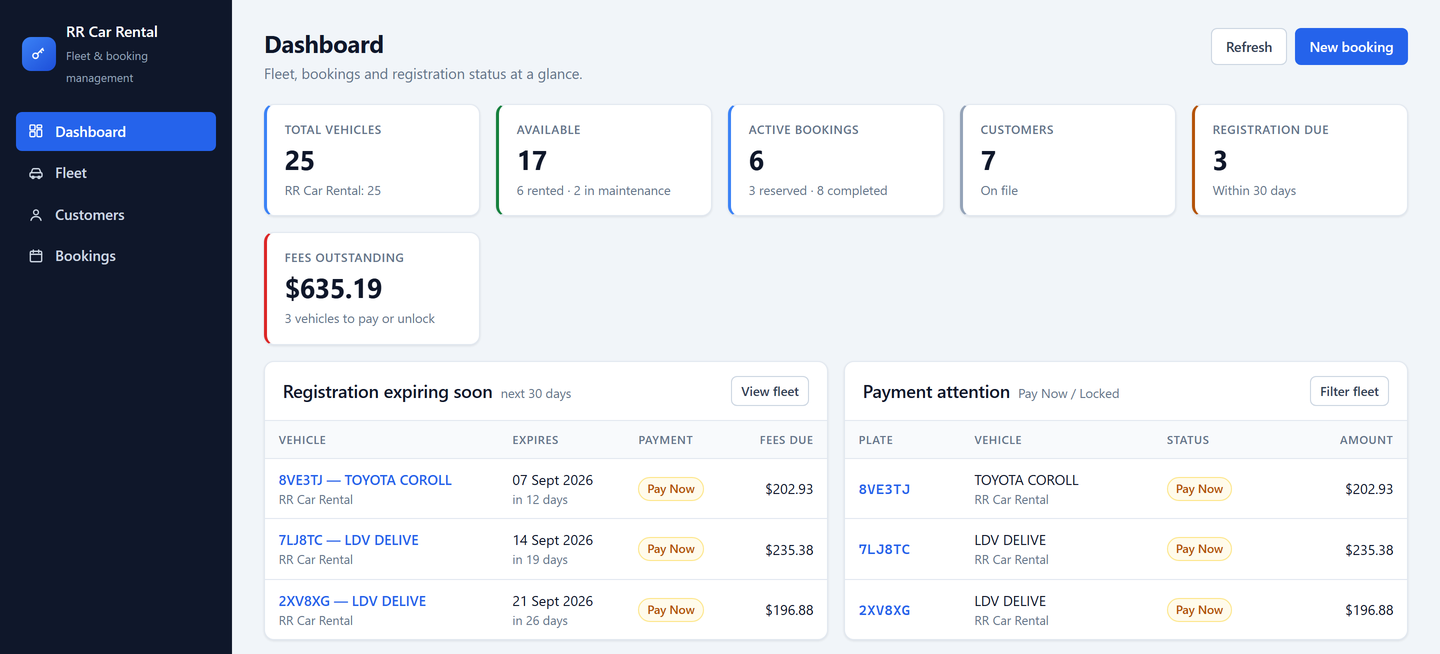
RR Car Rental — fleet & booking management
Fleet dashboard built by Double Bricks Digital for RR Automotive
The live fleet dashboard we built for RR Automotive, shown with sample records in place of client data.
Client testimonial — to be added after approval
Testimonial copy will sit here once the client has approved it.
Client name, RR Automotive
Who it’s for

Who Are Small Business Apps For?

We build practical business apps for a wide range of Melbourne small businesses, including:

Small business owners looking to simplify day-to-day operations
Service-based businesses
Rental businesses
Trades and contractors
Logistics and transport operators
Businesses managing vehicles or other physical assets
Businesses currently relying on spreadsheets to run part of their operation
Any business with a repetitive administrative process that’s costing more time than it should
Working together

Our Small Business App Development Process

The same four steps on every project, from the first conversation through to life after launch.

1
Understand the Problem
We take the time to understand what’s actually going wrong with your current process — not just what tool you think you need.
2
Design the Solution
We design a system around your actual workflow, keeping it as simple as the problem allows.
3
Build and Test
We develop the app and test it against real use, not just in theory.
4
Refine and Support
Once it’s live, we help refine the system as your business — and your needs — change.
Good questions

Frequently Asked Questions

What is a small business app?
+
In this context, a small business app is a practical, purpose-built tool that helps a business manage a specific part of its operations — such as tracking inventory, managing bookings, or replacing a manual spreadsheet-based process — without the cost or complexity of a large enterprise software system.
How much does a custom business app cost?
+
It depends entirely on the scope of the project — a simple internal dashboard is a very different job to a system with several connected workflows. We’ll give you an honest quote once we understand what you actually need.
Can you turn a spreadsheet into an app?
+
Often, yes. Many of the businesses we work with start exactly there — a spreadsheet that’s grown past what it can comfortably handle. We look at what the spreadsheet is doing and design a proper system around that same workflow.
Can you build an app using Google Apps Script?
+
Yes. Google Apps Script and other Google Workspace tools are technologies we use where they’re the right fit for the project — they can be a cost-effective way to build a practical internal system, particularly for businesses already using Google Workspace.
Can a small business app be customised to our workflow?
+
Yes — that’s the whole point of this approach. We design the system around how your business actually operates, rather than asking your business to adapt to generic software.
Can you connect a business app to Google Sheets?
+
In many cases, yes. Depending on the project, Google Sheets can serve as part of the underlying system, or a system we build can connect with spreadsheets you already use.
How long does small business app development take?
+
Timeframes vary depending on the complexity of what’s being built. We’ll give you a realistic estimate once we understand the scope of the project.
Let’s talk

Need a Simple System for Your Business?

If a manual process, a messy spreadsheet, or a piece of software that’s too big for what you need is slowing your business down, let’s talk about what a purpose-built app could look like for you.